Think about the last time your firm chose a new back office system. There was a demo, probably a reference call and a long list of questions before anyone signed. You test report writers against real cases. You judge a client portal on what your clients actually see. Now think about your LinkedIn account – When did you last look at it properly?
For many advisers, the Company Page was set up years ago and updated whenever there was a free afternoon. Nobody owns it and nobody can say whether it has brought in a single client!
Your personal profile was also most likely created when you started your first job and the only thing that you’ve changed is the place of work.
The company page and your profile do different jobs. The page carries the firm’s name and logo and gives clients something to follow. Prospects, however, almost always look up the person they are about to meet, so, in reality, your own profile does most of the work.
What LinkedIn does that your CRM and website cannot
Your Customer Relationship Management system holds the people you already know. It records what clients told you at their last review but it cannot tell you that an accountant who refers to you has moved to a new practice or that a client has just been promoted. LinkedIn shows you both, usually within days, and each one is a natural reason to get in touch.
Your website waits for people to arrive. Most prospects visit only when they’re already looking for an adviser. LinkedIn reaches them earlier, while they scroll their feed so your name is familiar long before they need financial advice.
LinkedIn also shows you who knows whom. When a prospect is a second-degree connection, you can see which of your clients, accountants or solicitors could introduce you. If your business runs on referrals, this is one of the most useful pieces of information you have, and few advisers ever look at it.
Finally but equally importantly, LinkedIn is where people check you out. A prospect who has been given your name by a friend will often look you up before replying. If your profile is thin or out of date, they form a first impression before you know they exist.
None of this replaces your CRM or your website. LinkedIn fills the gap between them.
Five steps to run it like a system
None of these takes longer than a software demo.
1. Give it an owner
Every system you rely on has someone responsible for keeping it working. Your own profile is yours to own. The company page needs an owner too, usually the principal in a small practice or marketing in a larger firm, with compliance involved from the start. Agree who that is, and check that every adviser’s current role links to the page so the firm’s logo appears on their profile. Then put a quarterly review in your diary, as you would for any other system, and use it for steps 2 and 5. Firm-wide standards for profiles and posting are a bigger job, and I will come back to them later in this series.
2. Audit your profile
Treat your profile like a system you are about to roll out to clients.
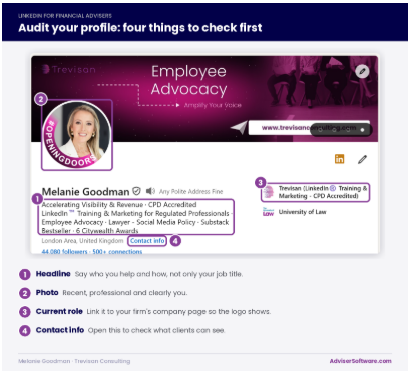
Check it against this standard:
- Your headline says who you help and how, rather than only “Chartered Financial Planner”.
- Your About section is written for clients (not a CV), in plain English and has been reviewed by compliance.
- Your firm name, job title and regulatory wording match your website exactly.
- Your photo is recent and professional.
- Your current role links to your firm’s company page so the logo appears.
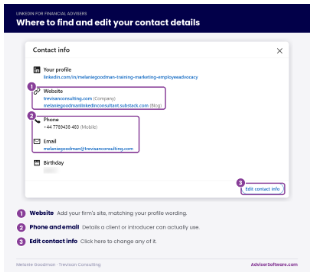
- Your contact details are fully completed and point to the right place(s).
Look especially for anything that still lists a previous firm or a role you left years ago. Fix that first, because it is the detail most likely to confuse a prospect.
The headline is where I start every profile review I carry out for financial advisers. One adviser I worked with this year described himself only as “Independent Financial Adviser”, followed by the name of a firm he had left eighteen months earlier. Nobody had pointed it out, including the accountants who referred clients to him and looked him up first. Ten minutes of editing fixed it.
3. Build it into your week
A system you only use when you remember delivers nothing. Attach LinkedIn to routines you already follow:
- After every first meeting, annual review or introducer conversation, send a connection request within two days with a short personal note. Mention something from the conversation, so it reads as a follow-up rather than a cold request.
- Add a field to your CRM that records whether each client and introducer is connected with you on LinkedIn. Some CRMs can link to LinkedIn’s paid Sales Navigator tool. Ask your provider what that link actually does before you pay for anything.
- Book fifteen minutes, three times a week, to read and comment on posts from clients and introducers. Thoughtful comments keep you visible to the people who matter most, and they are far simpler to get through compliance than original posts.
4. Decide what you will publish
Pick one subject you can speak on with authority, such as retirement income for business owners or protection for young families. Set a realistic frequency and agree a sign-off route with compliance that takes hours rather than weeks.
Approvals and social media policy deserve more space than I can give them here so I will come back to both later in this series.
5. Measure it
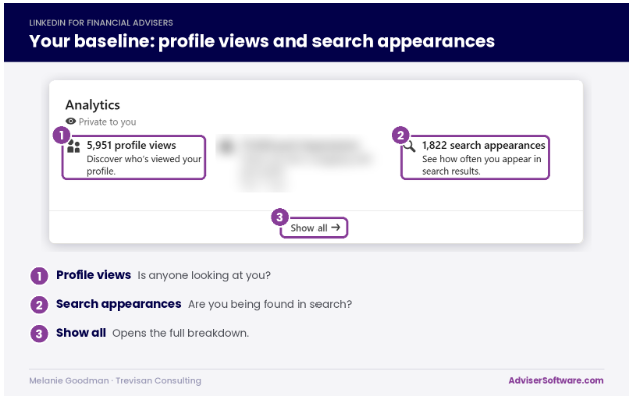
This is where many advisers fall down. LinkedIn’s own figures are easy to collect and easy to misread. Follower numbers and post impressions tell you about reach but they tell you very little about new business.
Set your baseline this month:
- Profile views and search appearances, both shown in LinkedIn’s analytics.
- The share of your current clients and introducers who are connected with you.
- The number of new conversations you started on LinkedIn.
- The number of new enquiries that mention LinkedIn.
The last figure needs one question in your first call with every new enquiry: “How did you hear about us, and did you look us up anywhere first?” It costs nothing and it is the only number that links LinkedIn directly to new clients.
Review the figures every quarter, alongside your other systems. If profile views rise but conversations do not, your profile needs work. If conversations rise but enquiries do not, look closely at what happens after the first message.
Where advisers go wrong
Two mistakes come up again and again:
- The first is treating your profile as a one-off job. You set it up once, then leave it while your role, your clients and your firm move on.
- The second is judging LinkedIn on a single post. You would never assess a new back office system on one week of data. Give LinkedIn the same patience, and allow two quarters before you decide.
You would not run any other system without an owner and a review date. Give LinkedIn both this month and by the spring you will know, with real numbers, whether it has earned its place in your stack.